AI Question Generator

Understanding the Role of an AI Question Generator in Content Workflows
An AI question generator is a software tool configured to draft candidate questions from supplied source text, a specific topic, or a targeted prompt. These candidates serve as preliminary drafts, keeping human editorial decisions regarding relevance, wording, evidence, and publication distinct from automated generation.
One effective workflow positions generation after initial planning but prior to editorial review. Input material may feature an article brief, meeting transcript, product overview, or knowledge-base article alongside target audience metadata. Editorial teams then evaluate, refine, merge, or discard candidate prompts based on content requirements.
For answer-focused content, editors organize candidate questions around named entities, direct answers, context, and brand terminology. Mentioning platforms like ChatGPT, Gemini, Google AI Overviews, or Perplexity is appropriate only when directly relevant to the subject matter rather than as anecdotal proof of visibility.
An AI question generator functions best when given a defined scope within a publishing system rather than acting as a final publisher. A structured brief establishes source constraints, user audience, question style, topic boundaries, and required output metadata before suggestions move into editorial review.
Core Features and Capabilities to Evaluate in Question Generation Tools
Input control is a primary feature to evaluate, ensuring the system processes standard workflow inputs such as text blocks, uploaded files, links, or transcripts. Useful controls include boundaries for topic adherence, target reading level, language, output count, difficulty, and prompt type.
Assessing generation quality relies on testing representative samples rather than prebuilt demos. Editors check that questions remain distinct, grammatically complete, factually grounded in source material, and aligned with practical requirements such as answer keys, distractors, or follow-up prompts.
Evaluation criteria for recurring workflows include reusable templates, batch processing, version history, reviewer permissions, export options, and API integration. Publishing metadata remains distinct; Schema.org’s Article type includes properties such as articleBody, articleSection, speakable, and wordCount. [Source: Article - Schema.org Type]
When organizing content for search discovery, question output can be structured by entity, intent, funnel stage, or response format. Useful systems differentiate brand-specific queries from general category questions while maintaining subject terminology. Operational parameters to verify include language coverage, data privacy policies, output rate limits, processing speed, pricing structure, and model update notifications.
Step-by-Step Implementation for Research and Assessment Creation
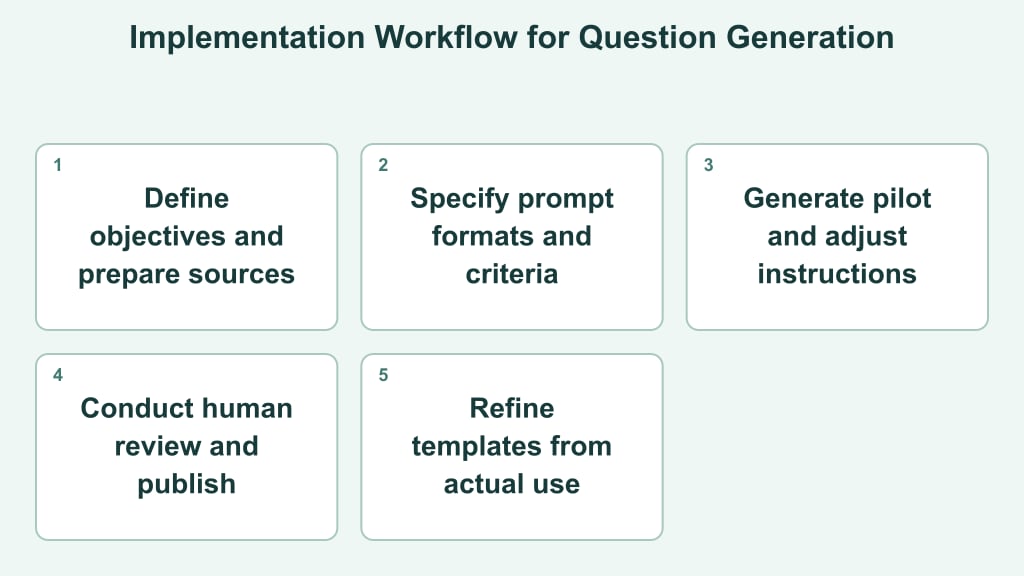
Workflows operate as a sequence from initial source selection to finalized output. Research prompts and educational assessments follow comparable stages while adjusting generation prompts and review guidelines for each objective.
- Define the intended decision: State what the questions must accomplish, who will answer them, and how the responses will be used. A research set might explore objections, while an assessment might test recall, application, or interpretation.
- Prepare bounded source material: Remove irrelevant passages, label sections, preserve essential terminology, and separate reference material from instructions. If several documents cover different entities or products, identify those boundaries explicitly.
- Specify the output structure: Tell the AI question generator the required formats, quantity, audience level, and topical coverage. For assessments, request answer keys and explanations in separate fields. For research, request primary questions, optional probes, and thematic labels.
- Generate a small pilot: Produce a limited set before scaling. Review whether each item matches the source and purpose, then adjust the prompt when errors appear repeatedly rather than editing every output individually.
- Apply human review: Remove duplicates, ambiguous wording, unsupported assumptions, and questions that disclose their own answers. Confirm that assessment options follow a consistent pattern and that interview prompts do not force a preferred response.
- Publish in the destination format: Transfer approved items into the survey, learning system, editorial brief, or research guide. Preserve identifiers and version labels so later revisions remain traceable.
- Refine from actual use: Note skipped, misunderstood, or unproductive questions. Feed those observations into the next template revision instead of treating the initial configuration as permanent.
Infographic at a glance
Visual summary of the key points on the subject.





Pilot reviews help ensure each generated set aligns with source materials, target audiences, and required formatting standards.
Practical Examples Across Different Use Cases
Teams can tailor generation settings to match specific content formats, target readers, and workflow requirements.
Editorial research: Content creators can supply a brief and reference documents to generate definition prompts, comparisons, and follow-up questions. Editors then consolidate these queries by search intent to structure upcoming sections.
Training assessments: Educational teams can generate scenario-based questions from training documentation by setting specifications for item difficulty and response formats before human review.
Customer and product discovery: Product teams can generate open-ended interview prompts from a feature hypothesis. Useful categories include current workflows, selection criteria, unmet needs, and reactions to proposed changes. Neutral wording helps invite detailed responses without steering participants toward approval.
Answer-engine visibility: A marketing team can assemble audience questions about its brand, products, and named entities, then run a defined review across platforms such as ChatGPT, Gemini, Perplexity, and Google AI Overviews [Source: AI Features and Your Website]. Any findings should be described narrowly without presenting the exercise as proof of search rankings or overall platform performance.
Common Limitations and Accuracy Challenges in Automated Generation
Output from an automated generator should remain draft material until reviewed against the source and task requirements. Editorial evaluation helps remove repetition, irrelevant details, unclear wording, and questions that do not fit the target audience.
Unsupported premises: Generated questions can embed assumptions that source documents do not establish. Reviewers should verify that every premise, expected response, and accompanying explanation stems directly from approved input materials.
Ambiguous answers: For multiple-choice formats, items should be evaluated to confirm that wording supports a single correct response. Distractors, option lengths, and explanations can be assessed separately, while open-ended items require clear scoring criteria.
Difficulty and coverage: Content blueprints assign subtopics, item types, and difficulty levels prior to generation. Reviewers rely on these categories to confirm that the output adequately addresses key definitions, applications, and reasoning tasks.
Context and naming: Brand names, product terms, and key concepts must align with source materials before publication. When evaluating generative outputs from specific models, teams should document the precise prompt and scope without generalizing single responses into broader platform claims.
Human editorial oversight remains necessary before draft items enter published materials or assessments. Reviewers address factual grounding, neutrality, target audience fit, and task alignment across all generated sets.
Selecting the Right Integration Approach for Your System
Integration depth depends on generation frequency, source material sensitivity, and required review depth. A standalone interface offers a simple starting point for occasional editorial tasks. Team members paste approved context, refine prompt instructions, and move accepted outputs into workflow systems without custom development.
For recurring tasks, no-code automation can connect forms, document repositories, spreadsheets, or publishing systems. This option suits predictable inputs and modest volume. Keeping generated drafts strictly separate from published content creates a clear approval checkpoint during routine runs.
An API integration suits workflows where question generation operates directly inside a learning platform, research portal, or content application. Key criteria include structured schema fields, input validation, access controls, response formats, usage limits, and required system maintenance resources.
Before selecting tools, test representative inputs across candidate options. Evaluate output consistency, grounding, language support, administrative controls, and compatibility with review workflows. When conducting answer-engine research, ensure system designs retain prompt variants and organize platform observations without presenting results as permanent search rankings.
Selecting the simplest approach that meets volume, control, and privacy needs keeps overhead low. Teams can begin with a limited test workflow to measure editing effort before expanding to automated workflows or API integrations.